# Operating Systems Explained: Windows, macOS, Linux, Android, iOS, ChromeOS, UNIX and BSD
Windows. macOS. Linux. Android. iOS. ChromeOS. BSD. UNIX.
Every operating system promises something different.
Speed. Security. Freedom. Simplicity.
But underneath the polished interfaces, app icons and marketing claims, every operating system is trying to solve the same fundamental problem:
How do you make an incredibly complex machine usable for humans and applications?
Every time you turn on your computer or unlock your phone, the operating system is already working.
It manages your CPU.
It manages memory.
It communicates with hardware.
It organizes files.
It runs applications.
It enforces security.
And while all operating systems perform these fundamental jobs, they make very different decisions about how to do them.
Those decisions create trade-offs.
There is no universally perfect operating system.
There are only different systems optimized for different priorities.
In this guide, we'll break down the world's major operating systems from first principles—how they work, who they're built for, where they excel and where they fall short.
# First, What Is an Operating System?
Before comparing Windows with Linux or Android with iOS, we need to understand what an operating system actually does.
Your device contains physical hardware:
- CPU
- RAM
- Storage
- GPU
- Network adapters
- Keyboard and mouse
- Display
- Cameras
- Sensors
- Other connected devices
Applications need to use this hardware.
But imagine if every application had to directly control the CPU, manage memory and understand how every possible storage device worked.
That would be chaos.
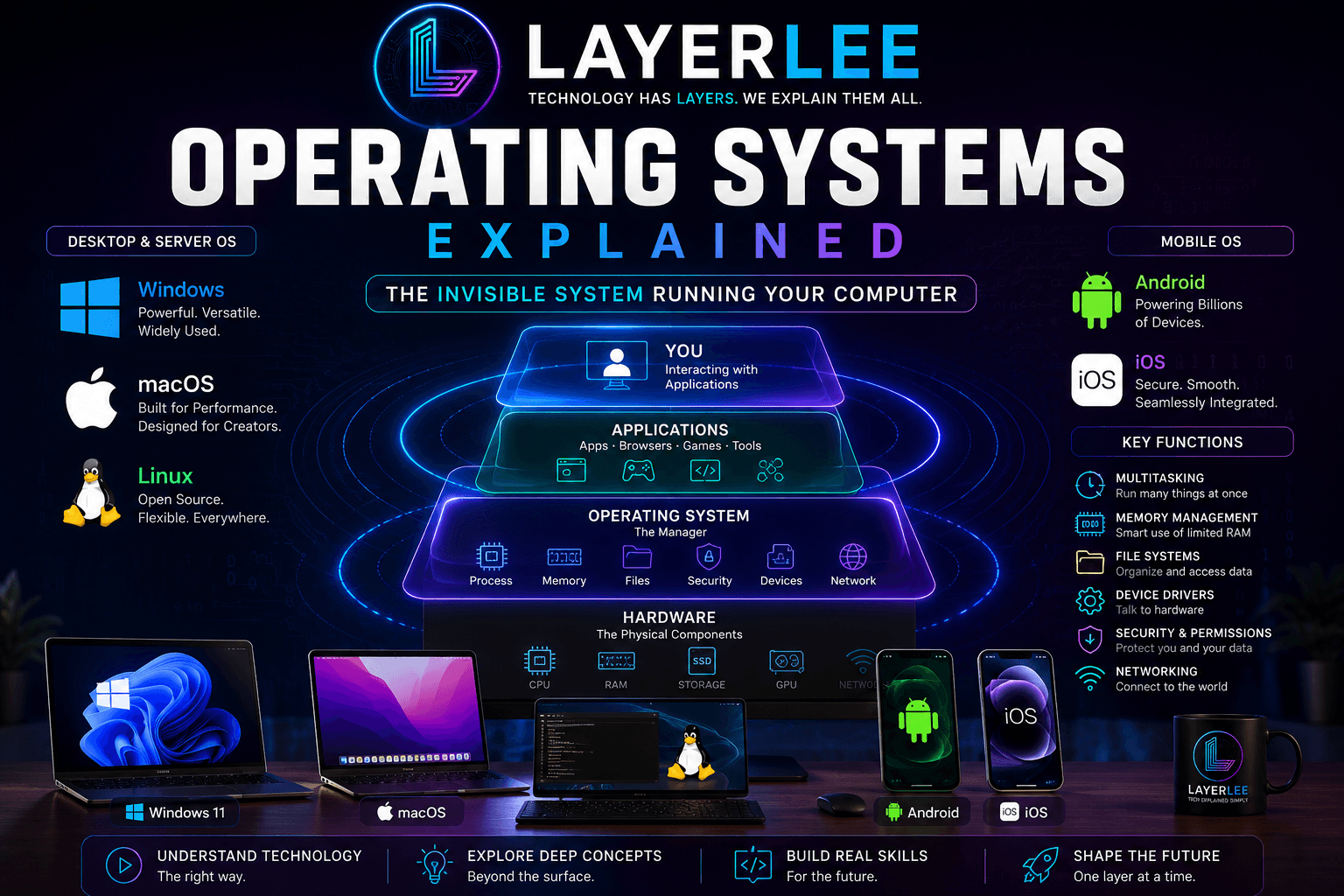
The operating system sits between the hardware and the software.
Hardware → Operating System → Applications → You
The operating system acts as the central coordinator of the entire machine.
1. Process Management
Your computer may look like it is doing many things simultaneously.
Your browser is open.
Music is playing.
Messages are arriving.
Background applications are running.
The operating system decides how CPU time is distributed between these tasks.
It determines:
- Which process runs
- When it runs
- How long it runs
- When another process gets CPU time
This process is known as scheduling.
2. Memory Management
RAM is limited.
The operating system tracks memory and helps ensure applications can use it without interfering with each other.
It decides where programs and data are stored in memory and manages how memory is allocated.
Modern operating systems also use concepts such as virtual memory to manage workloads more efficiently.
3. File Management
When you click Save, you don't think about sectors, storage controllers or physical locations on a drive.
You simply choose a folder.
The operating system handles the complexity underneath.
It manages:
- Files
- Folders
- File permissions
- File systems
- Reading data
- Writing data
- Storage organization
The simple file structure you see is an abstraction created by the operating system.
4. Hardware Management
Applications usually do not directly communicate with every hardware component.
Instead, the operating system coordinates access to hardware.
Drivers often help translate between the operating system and specific devices.
The simplified flow looks like this:
Application → Operating System → Driver → Hardware
This abstraction makes modern computing possible at scale.
5. Security
The operating system also controls access.
It helps determine:
- Who can access the system
- Which files a user can read
- What applications are allowed to do
- Which processes can access sensitive resources
- How software is isolated
Different operating systems make very different decisions about security and user control.
And this is where the major differences begin.
# Windows: Built for Compatibility
Windows is one of the most recognizable operating systems in the world.
Its biggest strength is not simply its interface.
It is its ecosystem.
Windows can run on an enormous range of computers.
A budget laptop.
A gaming PC.
A business workstation.
A custom-built desktop.
A high-performance workstation.
These machines may contain completely different hardware, yet Windows is designed to support an enormous number of configurations.
Why Windows Dominates Desktop Computing
Windows spent decades building compatibility with:
- Hardware manufacturers
- Software developers
- Businesses
- Peripheral manufacturers
- Game developers
This creates a powerful ecosystem.
More users attract more developers.
More developers create more software.
More software attracts more users.
The cycle becomes increasingly powerful.
Windows and Hardware Freedom
One of Windows' biggest advantages is choice.
You can choose your own:
- CPU
- GPU
- RAM
- Storage
- Motherboard
- Monitor
- Keyboard
- Other peripherals
You can even build an entire computer yourself and install Windows on it.
For many users, this flexibility is extremely valuable.
Windows and Gaming
Windows is also a major platform for PC gaming.
Its large user base and broad hardware ecosystem have made it a natural platform for:
- PC games
- Graphics hardware
- Game engines
- Gaming accessories
- Professional creative software
The Trade-Off
Compatibility creates complexity.
Supporting countless combinations of hardware and software is difficult.
Different computers may have different drivers.
Old software may still need support.
Hardware manufacturers may implement components differently.
That means Windows must deal with a huge and complicated ecosystem.
Windows prioritizes compatibility and choice—but supporting almost everything creates complexity.
Windows is best for:
- Gamers
- General PC users
- Businesses
- Custom PC builders
- Users needing broad software compatibility
- People who want maximum hardware choice
# macOS: Control Creates Consistency
macOS takes a very different approach.
Instead of supporting thousands of different computer configurations, macOS is designed specifically for Apple's hardware ecosystem.
Apple controls much more of the complete experience.
It designs the hardware.
It develops the operating system.
It develops many of the core applications.
This creates a tightly integrated system.
Why macOS Feels So Integrated
When one company controls both the hardware and operating system, the number of supported configurations is more controlled.
That can make optimization easier.
The platform can focus heavily on:
- Performance
- Battery efficiency
- Hardware integration
- Consistent design
- System-wide features
The result is an experience designed to feel unified.
Apple Silicon and Integration
Modern Apple computers demonstrate this philosophy clearly.
The processor architecture, hardware and operating system are designed as parts of a closely connected platform.
Instead of supporting every possible hardware combination, the system can be optimized around a more controlled range of devices.
The Trade-Off
The same control that creates consistency also limits freedom.
You generally cannot build a custom computer from random components and officially install macOS on it.
Hardware choices are tied to the Apple ecosystem.
Customization and upgradeability may also be more limited depending on the device.
macOS prioritizes integration and consistency—but that comes with less hardware freedom.
macOS is best for:
- Users invested in Apple's ecosystem
- Creative professionals
- Users who value consistency
- Developers building for Apple platforms
- People who prefer integration over hardware customization
# Linux: Freedom and Control
Linux is fundamentally different from Windows and macOS.
Technically, Linux refers to the Linux kernel—the core component responsible for managing important system resources and communicating with hardware.
Complete operating systems can then be built around that kernel.
This is why Linux exists in many different forms, commonly called distributions.
Different distributions can be designed for different goals.
Some prioritize simplicity.
Some prioritize stability.
Some prioritize cutting-edge software.
Some are designed for servers.
Some are designed for security research.
Some are designed for complete user control.
Why Linux Powers So Much of the Internet
When you visit a website, stream a video or use an online application, Linux is often part of the infrastructure working behind the scenes.
Linux became extremely important in server environments because of its:
- Flexibility
- Automation
- Command-line tools
- Customization
- Open-source ecosystem
Administrators can configure systems very precisely.
Developers can build and modify software around their specific requirements.
The Open-Source Model
Much of the Linux ecosystem is based on open-source software.
This allows communities and organizations to:
- Inspect source code
- Modify software
- Build custom systems
- Contribute improvements
- Adapt software for specialized environments
This level of control is one of Linux's defining characteristics.
The Trade-Off
Freedom creates more choices.
More choices can create more complexity.
Different Linux distributions may use different:
- Package managers
- Desktop environments
- Configuration systems
- Software repositories
- Release models
The experience is not always as standardized as Windows or macOS.
Linux prioritizes freedom and control—but more flexibility can require more technical knowledge.
Linux is best for:
- Developers
- System administrators
- Server infrastructure
- Technical users
- Open-source enthusiasts
- Users who want deep customization
# ChromeOS: Computing Built Around the Web
Traditional desktop operating systems were built around the idea that most of your applications and files lived directly on your computer.
ChromeOS takes a different approach.
Its philosophy is heavily connected to the web.
Think about what many people already do on a computer:
- Browse the web
- Check email
- Write documents
- Attend meetings
- Watch videos
- Use online applications
- Store files online
For these users, the browser is already one of the most important applications on the computer.
ChromeOS builds heavily around this idea.
Why ChromeOS Feels Different
ChromeOS focuses heavily on providing a streamlined environment for web-based computing.
Instead of exposing users to every layer of traditional desktop complexity, it emphasizes simplicity.
For users whose work primarily happens online, this approach can make a lot of sense.
The Trade-Off
ChromeOS is not designed around the same level of traditional desktop flexibility as systems such as Windows, macOS or Linux.
Specialized professional applications, advanced gaming and highly customized workflows may be better suited to another platform.
ChromeOS prioritizes simplicity and web-based computing—but offers less traditional desktop flexibility.
ChromeOS is best for:
- Students
- Schools
- Web-focused users
- Basic productivity
- Cloud-based workflows
- Users who want simplicity
# Android: The World's Largest Mobile Ecosystem
Android brought a powerful operating system to an enormous range of mobile devices.
Android phones can look completely different from one another.
They can have different:
- Screens
- Cameras
- Processors
- Designs
- Features
- Prices
This diversity is one of Android's defining strengths.
Why Android Became So Widespread
Android allowed manufacturers to build devices across a huge range of markets.
From affordable smartphones to premium flagship devices, Android can be adapted to different hardware.
That helped create an enormous global ecosystem.
Flexibility
Depending on the device, Android can provide significant flexibility in:
- Device choice
- Hardware design
- Customization
- Software features
- Price
Different manufacturers can create different experiences around the same general operating system platform.
The Trade-Off: Fragmentation
Supporting a huge number of devices creates fragmentation.
Different devices may:
- Run different versions
- Receive updates at different times
- Include manufacturer modifications
- Support different features
The strength of Android—its enormous diversity—is also one of its biggest challenges.
Android prioritizes choice and flexibility—but a huge ecosystem creates fragmentation.
Android is best for:
- Users who want device choice
- People who value customization
- Users across many budgets
- People who want a wide range of hardware options
# iOS: Consistency Through Tight Control
iOS takes a more controlled approach to mobile computing.
Apple controls both the iPhone hardware and the operating system.
This means the platform is built around a more tightly managed set of devices.
Apple also controls major parts of:
- The hardware
- The operating system
- The application ecosystem
- The update process
Why iOS Feels Consistent
The number of hardware configurations is far more controlled than across the entire Android ecosystem.
Developers can target a more standardized platform.
The software experience can therefore be designed with a strong focus on consistency.
This contributes to:
- Predictable interface behavior
- Tight ecosystem integration
- Standardized application behavior
- A consistent user experience
The Trade-Off
More control usually means fewer options for system-level customization.
Users have less freedom to modify the platform compared with a more open ecosystem.
iOS prioritizes consistency and integration—but gives users less system-level freedom.
iOS is best for:
- Users who value consistency
- People invested in the Apple ecosystem
- Users who prefer a tightly integrated experience
- People who want a standardized mobile platform
# UNIX: One of the Foundations of Modern Computing
UNIX is one of the most influential names in operating system history.
Its importance is not only about the number of people directly using traditional UNIX systems today.
Its real importance lies in its influence.
UNIX ideas shaped generations of operating systems and software.
Its philosophy of building relatively simple tools that can work together became deeply influential in computing.
Why UNIX Still Matters
Even if you never directly use a traditional UNIX system, its influence can be found throughout modern computing.
UNIX and UNIX-like concepts influenced:
- Server systems
- Enterprise computing
- Development environments
- Networking infrastructure
- Modern operating system architecture
UNIX represents a major branch in the evolution of computing.
UNIX is not simply an old operating system. Its ideas helped shape much of the computing world that came after it.
UNIX remains important for:
- Enterprise computing
- Large-scale systems
- Historical understanding
- Infrastructure
- Understanding modern operating system design
# BSD: Quietly Powering Important Infrastructure
BSD stands for Berkeley Software Distribution.
Like UNIX, BSD has had a major influence on modern operating systems.
BSD systems are respected for their approach to system design, networking and infrastructure.
Some BSD systems are used in specialized technical environments and important infrastructure.
A More Integrated System Approach
One important difference between the Linux and BSD worlds is how the overall system is developed.
Linux systems are commonly assembled around the Linux kernel together with many additional components.
BSD projects often develop and maintain a more integrated operating system environment as a complete project.
This creates a different approach to development and system design.
The Trade-Off
BSD has a smaller mainstream consumer ecosystem compared with Windows, macOS and Linux.
That can mean less support for:
- Consumer hardware
- Commercial desktop applications
- Mainstream gaming
But in specific technical and infrastructure environments, BSD remains highly significant.
BSD prioritizes cohesive system design and technical reliability—but has a smaller mainstream ecosystem.
BSD is best for:
- Network infrastructure
- Servers
- Technical users
- Specialized systems
- People interested in UNIX-like system design
# The Most Important Lesson: Every Operating System Is a Trade-Off
The biggest mistake when comparing operating systems is asking:
Which one is the best?
There is no useful answer without another question.
Best for what?
A gamer has different needs from a programmer.
A student has different needs from a system administrator.
A video editor has different needs from someone managing cloud servers.
Every operating system optimizes for something.
| Operating System | Major Strength | Main Trade-Off |
|---|---|---|
| Windows | Compatibility and hardware choice | Greater ecosystem complexity |
| macOS | Hardware and software integration | Less hardware freedom |
| Linux | Freedom and customization | More technical complexity |
| ChromeOS | Simplicity and web computing | Less traditional desktop flexibility |
| Android | Device choice and flexibility | Fragmentation |
| iOS | Consistency and ecosystem integration | More platform restrictions |
| UNIX | Foundational influence and enterprise importance | Less focused on mainstream consumer computing |
| BSD | Cohesive design and infrastructure use | Smaller mainstream ecosystem |
This is the real way to understand operating systems.
Not as winners and losers.
But as different answers to the same engineering problems.
# Which Operating System Should You Choose?
Choose Windows if...
You want broad software compatibility, strong gaming support and a huge range of hardware choices.
It is particularly useful if you need specialized applications or want to build and customize your own PC.
Choose macOS if...
You value a tightly integrated hardware and software experience and are comfortable with Apple's ecosystem.
It is a strong choice for users who prioritize consistency and ecosystem integration.
Choose Linux if...
You want control.
Linux is particularly powerful for development, servers, system administration and users who want to understand and customize their systems.
Choose ChromeOS if...
Most of your work happens in a browser.
For web applications, cloud storage, education and basic productivity, ChromeOS provides a simple approach to computing.
Choose Android if...
You want choice.
Android provides access to a massive variety of devices across different prices, designs and hardware configurations.
Choose iOS if...
You value consistency and a tightly integrated mobile experience.
It is especially compelling for users already using other Apple devices.
Consider UNIX or BSD if...
Your interests involve enterprise systems, networking, infrastructure or deeper operating system concepts.
They may not be the default choice for every consumer, but their influence and technical importance are enormous.
# The Bigger Picture
An operating system is much more than the interface you see after turning on your device.
Behind every app icon and every click, something is constantly coordinating the machine.
The operating system manages:
- CPU time
- Memory
- Processes
- Files
- Storage
- Hardware
- Drivers
- Users
- Permissions
- Security
Without it, modern hardware would be far more difficult for humans and applications to use.
Windows, macOS, Linux, Android, iOS, ChromeOS, UNIX and BSD all solve these problems differently.
And those differences reveal something important.
Technology is full of trade-offs.
More freedom can mean more complexity.
More control can mean less customization.
More compatibility can mean a more complicated ecosystem.
More simplicity can mean fewer advanced options.
There is no perfect operating system.
There is only the operating system that best fits what you need.
And once you understand that, you stop looking at Windows, macOS or Linux as just different interfaces.
You start seeing the deeper engineering decisions underneath.
# Watch the Full LayerLee Video
This article gives you the bigger picture, but the full LayerLee video takes you visually through every major operating system—from Windows and macOS to Linux, ChromeOS, Android, iOS, UNIX and BSD.
Watch the complete explanation:
👉 Every Major Operating System Explained — Watch on LayerLee
Windows. macOS. Linux. Android. iOS. ChromeOS. BSD. UNIX.
Different systems.
Different philosophies.
Different trade-offs.
Understand the layers, and technology starts making more sense.

Written by Bipin Baral
Full-stack software engineer writing empirical, people-first technical breakdowns on operating systems, distributed systems, and backend architecture.
Frequently Asked Questions
Deep-dive answers and explanations about Every Major Operating System Explained: Windows, macOS, Linux, Android, iOS, ChromeOS, UNIX & BSD